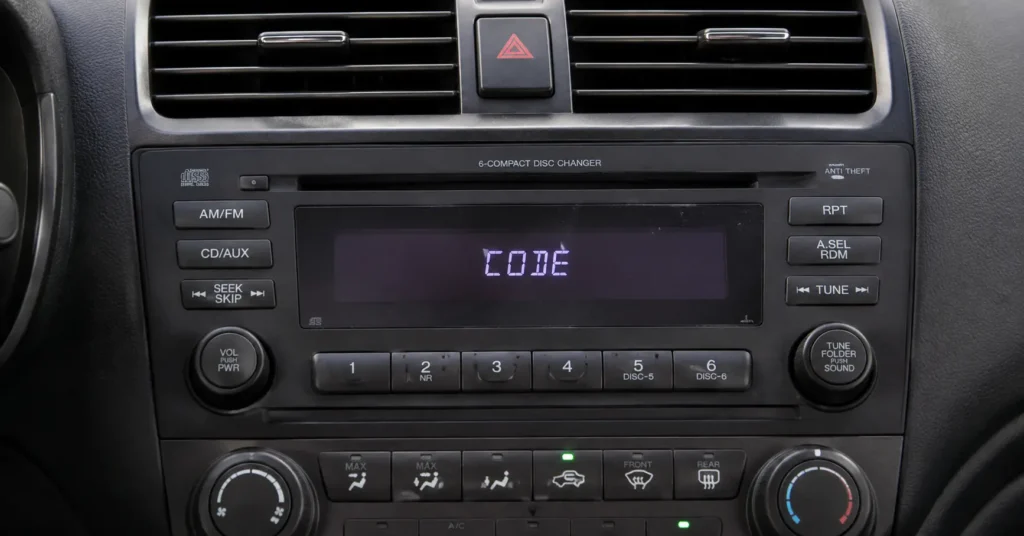
If your Honda radio suddenly displays CODE, ENTER CODE, or refuses to play after the battery was disconnected, the radio has most likely activated its anti-theft security system.
The good news is that this does not usually mean the radio is damaged.
You need the correct Honda radio code for the specific audio unit installed in your vehicle.
This website explains how to find your Honda radio code by VIN, how to locate your radio serial number, where to find your VIN, how to retrieve the correct security code, and how to enter the code once you have it.
Whether you drive a Honda Accord, Civic, CR-V, Fit, Odyssey, Pilot, Ridgeline or another Honda model, start here to identify the information you need and choose the right guide.
Honda Radio Code: Why Is My Radio Locked?
Honda radios can use an anti-theft security system that disables the audio unit when electrical power is interrupted.
This can happen after:
- The vehicle battery has gone flat.
- The battery has been disconnected.
- The battery has been replaced.
- A fuse has been removed.
- The radio has been disconnected during repairs.
- The original radio has been removed and reinstalled.
- Electrical work has interrupted power to the audio system.
When power is restored, the radio may display CODE and ask for its security code.
The code is not simply a universal number that works for every Honda. The security code is associated with the particular radio or navigation unit, which is why identifying the correct serial number is so important.
If your Honda radio is showing CODE after a battery change, do not assume that the unit needs to be replaced.
In many cases, you simply need to recover the original security code.
How to Get a Honda Radio Code by VIN
The phrase Honda radio code by VIN is commonly used to describe the process of recovering a lost Honda radio security code using information connected to the vehicle and its audio unit.
However, there is an important detail to understand.
A VIN by itself is generally not enough to identify every Honda radio code.
For the official Honda retrieval process, you may need several pieces of information, including:
- Your Honda VIN.
- The radio or navigation serial number.
- Your ZIP code or other requested vehicle information.
- Contact information requested by the official Honda system.
- The correct vehicle model and model year.
The VIN identifies the vehicle, while the radio serial number helps identify the particular audio or navigation unit.
That distinction is extremely important if you are trying to recover a lost Honda radio code.
Where Can I Find My Honda VIN?
The VIN, or Vehicle Identification Number, is a unique identification number assigned to your vehicle.
Depending on the Honda model and market, you can usually find the VIN in places such as:
- The lower portion of the windshield.
- The driver’s-side door jamb or door pillar.
- Vehicle registration documents.
- Insurance documents.
- Other vehicle identification paperwork.
Your VIN should be copied exactly as it appears.
A single incorrect character can cause the information submitted to the code-retrieval system to fail.
Where Can I Find the Honda Radio Serial Number?
The radio serial number is just as important as the VIN when recovering many Honda radio codes.
Some Honda systems allow the serial number to be displayed electronically.
On supported older Honda radios, a common procedure is to switch the ignition to the appropriate position, keep the radio off, press and hold the 1 and 6 preset buttons, and then turn the radio on.
If the system supports this procedure, the radio can display an eight-digit serial number, sometimes in two groups.
The exact procedure varies according to the radio and vehicle.
Honda documentation also confirms that some systems use a serial number located on an anti-theft card, sticker or other documentation, while some vehicles require different procedures to identify the unit.
If you are unsure what number you are looking at, do not randomly enter numbers from the radio label. Make sure you have identified the actual radio serial number.
Honda Radio Code Calculator and Official Retrieval
A common search is Honda radio code calculator.
It is important to understand what a legitimate Honda code-retrieval process actually does.
The code is not normally generated by performing a simple mathematical calculation on the VIN.
Instead, the official Honda system uses vehicle and audio-unit information to retrieve the security information associated with the radio or navigation system.
Honda’s current owner information explains that U.S. customers can retrieve radio and navigation codes through Honda’s official system when they have the required VIN and device serial number.
You can use Honda’s official radio and navigation code service here:
Honda Radio & Navigation Code Retrieval
Our goal here is to explain the process clearly so you know what information you need before beginning.
What Information Should You Prepare?
Before starting the retrieval process, have the following information available:
1. VIN
Write down the complete VIN exactly as it appears on the vehicle.
2. Radio serial number
This identifies the audio unit that needs to be unlocked.
3. Vehicle information
Depending on the Honda system and model year, additional vehicle information may be requested.
4. Contact information
The official U.S. Honda retrieval process may request information such as ZIP code, phone number and email address.
Having everything ready before you begin makes the process much easier.
Honda Radio Code by Model
Different Honda models can use different audio systems, displays and procedures.
For that reason, we have created model-specific guides rather than forcing every Honda owner to follow the same instructions.
Honda Accord Radio Code
If you own an Accord and the radio is asking for its security code, start with our dedicated guide:
Honda Accord Radio Code by VIN
The guide explains the information required to retrieve the code and how to enter the recovered code into the radio.
You can also read our separate guide covering the Honda Accord stereo code if your question is specifically about entering or identifying the stereo security code.
Honda Civic Radio Code
The Civic has been produced with multiple generations of audio systems, so the exact procedure can depend on the vehicle and radio.
If your Civic radio is locked, see our dedicated guide:
Start by identifying your VIN and radio serial number before attempting to enter a code.
Honda CR-V Radio Code
A disconnected battery can cause a Honda CR-V radio to request its security code.
Our dedicated guide covers both code retrieval and resetting the radio:
Honda CR-V Radio Code Reset and Repair
The most important rule is simple: make sure the code belongs to the radio installed in your vehicle before entering it.
Honda Fit Radio Code
Honda Fit owners can use our model-specific instructions when the radio becomes locked:
How to Enter Honda Fit Radio Code
The correct entry procedure can vary depending on the audio system fitted to the vehicle.
Honda Odyssey Radio Code
If your Honda Odyssey radio displays CODE after a power interruption, use the dedicated guide:
The guide explains the retrieval process and what to do after you obtain the security code.
Honda Pilot Radio Code
For a locked Honda Pilot radio, see:
Before attempting multiple codes, confirm that you have the correct serial number and the correct security code for your radio.
Honda Ridgeline Radio Code
Honda Ridgeline owners can find model-specific information here:
The guide explains how to approach the code-retrieval problem and what information you should have ready.
How to Enter a Honda Radio Code
Once you have recovered the correct Honda radio code, the next step is entering it into the radio.
Many older Honda radios use numbered preset buttons to enter the five-digit security code.
For example, if your original code were 12345, you would enter the digits using the radio’s preset controls in the required sequence.
The exact behavior of the display can vary by radio model.
Some systems will show letters or the word CODE while the digits are being entered.
Do not assume that every Honda audio system uses exactly the same button sequence.
If your radio does not respond as expected, stop and check the instructions for your particular model and audio unit.
What If I Enter the Wrong Honda Radio Code?
Avoid repeatedly guessing codes.
A Honda security system may limit the number of unsuccessful attempts, and some systems can temporarily prevent further attempts after too many incorrect entries.
The safest approach is to identify the correct radio serial number and obtain the correct code before entering anything.
Honda owner’s documentation for older systems describes limits on unsuccessful attempts and explains that the radio may require a waiting period before another attempt can be made.
Honda Radio Code After Battery Replacement
One of the most common reasons people search for Honda radio code is a battery replacement.
The situation is straightforward:
Battery disconnected → radio loses power → anti-theft system activates → display asks for CODE → original security code is required.
This does not automatically mean that the radio has failed.
If the radio worked normally before the battery was disconnected and immediately began displaying CODE afterward, the security lock is one of the first things you should investigate.
The same situation can happen after electrical repairs, a dead battery or removal of the radio fuse.
Can I Get a Honda Radio Code Without the VIN?
This depends on the vehicle, radio system, market and information available to you.
For the current U.S. Honda retrieval process, Honda states that the VIN and radio or navigation serial number are required for obtaining the code.
If you have lost your original anti-theft card, start by locating the radio serial number.
For some older Honda systems, the serial number can be displayed electronically.
For other systems, the serial number may be printed on a label attached to the unit or may require assistance from a Honda dealer.
Honda Canada likewise explains that the radio serial number is important when the original security-code card is missing, and that older systems may require dealer assistance to access the unit.
Honda Radio Code vs. Radio Serial Number
These two numbers are easy to confuse.
They are not the same thing.
VIN: identifies the vehicle.
Radio serial number: identifies the particular radio or navigation unit.
Radio security code: unlocks the radio after the anti-theft system has been activated.
Understanding the difference can save a lot of time.
If a website, dealer or official Honda system asks for the radio serial number, do not enter the VIN instead.
Likewise, do not assume that the serial number printed on every label is automatically the security code.
What If the Honda Radio Was Replaced?
This is an important situation.
If the original factory radio was removed and another radio was installed, the code associated with the original vehicle may not unlock the replacement unit.
The security information is associated with the audio equipment, not simply with the Honda model name.
If your Honda has a replacement radio, identify the serial number of the radio currently installed in the vehicle before attempting to retrieve a code.
This is particularly important when buying a used Honda or replacing a damaged factory radio.
Honda Navigation Code
Some Honda vehicles use a navigation system that can also become locked after a power interruption.
Honda treats radio and navigation codes as device-specific anti-theft codes.
If your vehicle has factory navigation, make sure you request the appropriate navigation information rather than assuming that a radio code and navigation code are interchangeable.
For navigation-specific instructions, always identify the exact system fitted to your Honda.
Frequently Asked Honda Radio Code Questions
Why does my Honda radio say CODE?
The radio may have lost electrical power and activated its anti-theft security system. A battery replacement or disconnection is one of the most common triggers.
Is the Honda radio code always five digits?
Many Honda factory radios use a five-digit security code, particularly older systems, but the exact system can vary by vehicle, radio and model year.
Can the VIN alone tell me my Honda radio code?
Not necessarily. The official U.S. Honda process requires the VIN together with the radio or navigation serial number and other requested information.
Where is the Honda radio serial number?
Depending on the radio, it may be available electronically through the radio display, on an anti-theft card, in vehicle documentation or on a label attached to the audio unit.
Can I find the Honda radio code after changing the battery?
Yes, the purpose of the security-code system is precisely to prevent unauthorized use after the radio loses power. You need to recover the correct code before the radio can be unlocked.
What should I do if the code does not work?
Stop entering random numbers. Verify the VIN, radio serial number and code. If the radio has been replaced, make sure the code belongs to the unit currently installed in the vehicle.
Start With Your Honda Radio Problem
If your Honda radio is locked, you do not need to start by replacing the radio.
Start with the information already connected to your vehicle.
Find your VIN.
Identify your radio serial number.
Determine which Honda model and audio system you have.
Retrieve the correct security code.
Enter the code carefully.
If you want model-specific instructions, choose your Honda below:
- Honda Accord Radio Code by VIN
- Honda Civic Radio Code Reset
- Honda CR-V Radio Code Reset and Repair
- How to Enter Honda Fit Radio Code
- Honda Odyssey Radio Code
- Honda Pilot Radio Code
- Honda Ridgeline Radio Code
- Honda Stereo Code by VIN
- How to Find Honda Car Stereo Code
The most important thing is to use the correct code for the exact radio installed in your Honda.
If your display says CODE after a battery change or power interruption, the problem may be much simpler than it first appears.